Complete Guide to Setting Up Your IPTV Subscription Easily (IPTV in Canada)

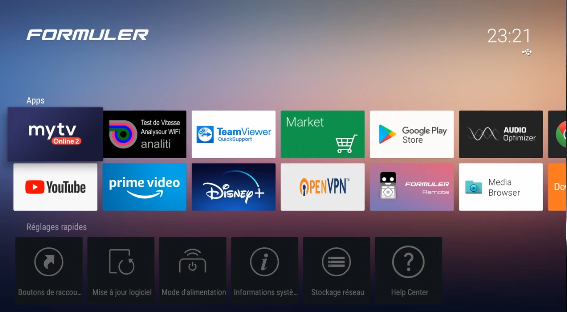
Step 1: Open the MYTVOnline App

To get started, open the MYTVOnline app on your compatible box or device.

MYTVOnline is a convenient app for enjoying a stable IPTV subscription with an easy-to-use interface.

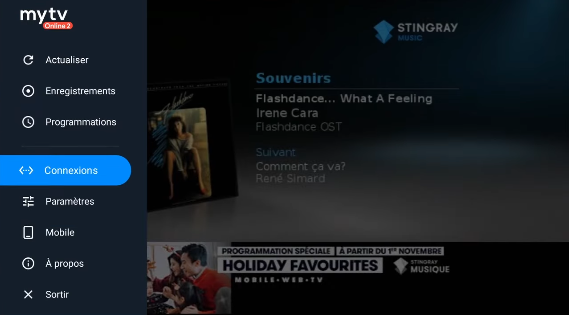
Step 2: Access the Login Section

Once you are inside the app, scroll down to the Login section, then click on it to continue with the setup.
Step 3: Add an IPTV Portal

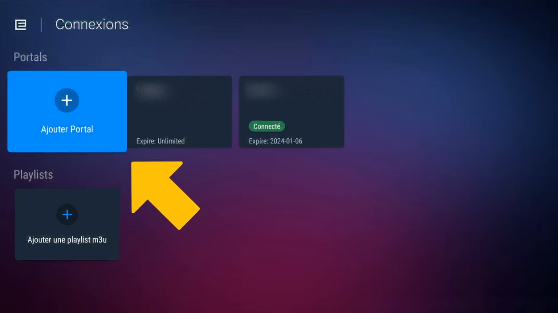
In the Login section, select “Add Portal.”

This step is essential for connecting your IPTV subscription to MYTVOnline and continuing the setup process.

Step 4: Get Your IPTV Login Details

To receive your IPTV login credentials, visit our pricing page:
https://subscription-iptv.ca/pricing-2/👉 Check Our IPTV Plans

Choose the IPTV plan that best suits your needs, then complete your order.

This option is ideal for users looking for a reliable IPTV service in Canada and an easy way to set up their IPTV subscription on MYTVOnline.


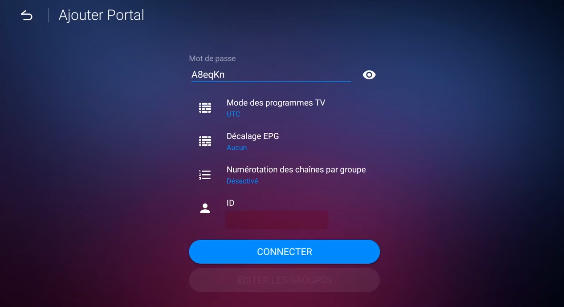
Step 5: Enter Your Login Details on MYTVOnline

After signing up, you will receive your IPTV login details.

Return to the MYTVOnline app, enter the required credentials, and then click “Continue.”

Step 6: Enjoy Your IPTV Subscription

Congratulations! 🎉

Your IPTV subscription on MYTVOnline is now active.

You can now easily access your TV channels, movies, and series and enjoy your entertainment on your compatible device.

Leave A Comment